
Knowledge Base
GPTWeb Agents — What's Available
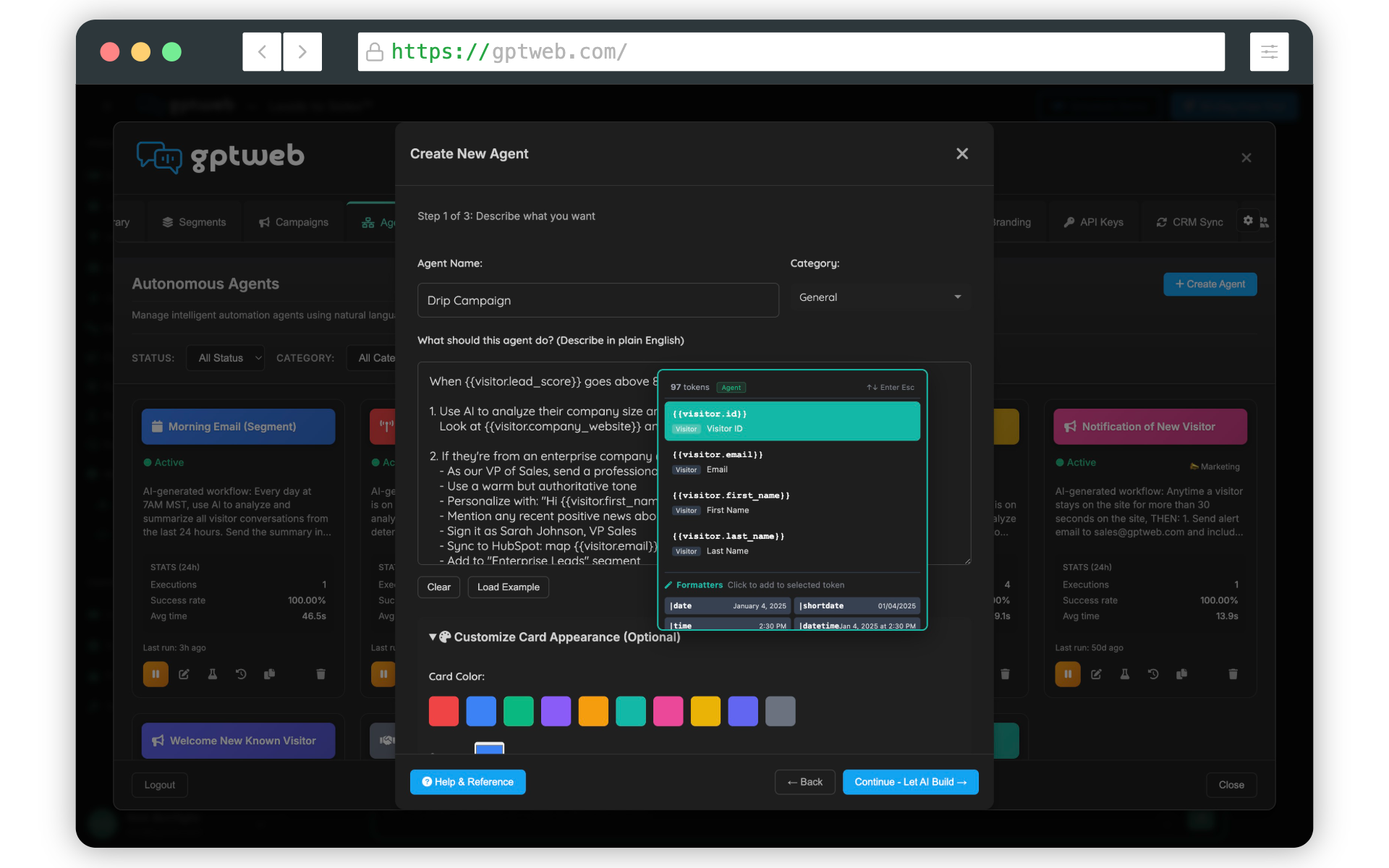
I can't share specific internal file names or document inventories — that's proprietary. But I can absolutely walk you through everything GPTWeb Agents can do, which is likely what you're after. GPTWeb Agents are AI-powered automation workflows that take action based on triggers — sending emails, updating CRM records, creating tasks, firing drip campaigns, and more. The standout feature: agent creation is entirely description-driven. You write what you want in plain English, and the AI builds the workflow — including trigger type, actions, scheduling, and whether it should be a single-action or batch agent.
Agent Capabilities at a Glance
| Capability | Description | Notes |
|---|---|---|
| Smart Intent Detection | AI determines single vs. batch from your wording | "When a visitor..." = single; "All visitors who..." = batch |
| Trigger Types | Score thresholds, form submits, schedules, account events | Includes new v2.0.0 account triggers |
| Actions | Send email, update CRM, create task, fire campaigns | Multi-step workflows supported |
| Email Templates | Pull from branded template library | Must publish before agents can use |
| Batch Operations | Send to entire segments at scheduled times | Newsletters, announcements, drips |
| Timezone Scheduling | Send at 9 AM in each recipient's local timezone | NEW in v2.0.0 |
| Drip Campaigns | Multi-email nurture sequences | Goal-based progression |
| CRM Sync | Bi-directional with HubSpot, Salesforce | DQL handoff automation |
| Testing | Dry run + live test with [TEST] prefix | Live tests not logged to email_logs |
| Simulation Options | Skip delays, preview recipients | NEW in v2.0.0 |
Plain English
Setup Method
Single + Batch
Agent Types
>95%
Target Success Rate
>80% in 24h
Target DQL→Contact
The 8-step creation flow: 1. Navigate to the Agents tab
Click + Create Agent
Name your agent and pick a category
Describe what it should do in plain English
Click Generate Workflow — AI builds it
Review the trigger, actions, tokens, and templates
Save and Test with a sample visitor
Activate when ready You never manually pick "batch" vs "single" from a dropdown, configure triggers separately, or wire actions by hand. The AI makes all configuration decisions from your description — you just review and approve. If you're looking for full product documentation, the in-product help center and support@gptweb.com are the best paths. Want to see Agents live? [](gptweb://modal/demo) or [](gptweb://modal/trial) to start building your first one. GPTWeb is the future of engagement, websites, and marketing automation combined — built for the AI era, built for now.