
Knowledge Base
GPTWeb Batch Operations, Email Campaigns & Agent Templates
Hi, Welcome back! Let me break down how GPTWeb's batch operations, email campaigns, and templates work together with agents to create powerful automated workflows.
How Agents Work with Email Templates
Agents are AI-powered automation workflows that trigger on visitor actions or scheduled times. When combined with email templates (created in Branding → Email Templates), agents can send professional, branded emails automatically.
Agent Email Workflow
When an agent sends an email with AI zones: 1. Agent Executor runs AI generation for each dynamic zone
Generated content is substituted into the template
Tokens are replaced with visitor data (name, company, etc.)
Email is sent with personalized content
Batch Operations: Sending to Segments
Batch operations let you send emails to entire segments at scheduled times - perfect for newsletters, announcements, or marketing campaigns.
Batch Campaign Workflow
Batch Email Process Flow
Agent Description Example
"Every Monday at 9am, send the 'Weekly Digest' template
to everyone in the 'Newsletter Subscribers' segment."
to everyone in the 'Newsletter Subscribers' segment."
Organizations like your organization use batch operations for:
- Weekly newsletters to engaged visitors
- Product announcements to specific segments
- Event invitations to targeted audiences
- Re-engagement campaigns for inactive users
Batch Template Requirements
- Include unsubscribe link using ✓
- Work for all recipients - avoid overly specific personalization ✓
- Have compelling subject lines - these are marketing emails ✓
- Include your branding using ✓
Drip Campaigns: Multi-Email Nurture Sequences
Drip campaigns send a series of automated emails over time to nurture prospects., GPTWeb offers two powerful approaches to build drip campaigns with agents.
Drip Campaign Timeline
Approach 1: Scheduled Emails (Recommended)
Best for custom drip timing with exact control over each email.
Agent Description:
"When visitor signs up, send welcome email immediately,
then follow-up at +3 days, +7 days, and +14 days using
the 'Drip 1', 'Drip 2', 'Drip 3', and 'Drip 4' templates."
"When visitor signs up, send welcome email immediately,
then follow-up at +3 days, +7 days, and +14 days using
the 'Drip 1', 'Drip 2', 'Drip 3', and 'Drip 4' templates."
How it works:
• Creates multiple schedule_send_email actions
• Each email scheduled relative to trigger time
• You select templates for each email in workflow review
• Emails stored in scheduled_emails table until delivery time Pros: Complete control, different templates per email, flexible timing
Cons: Each visitor's drip runs independently
• Creates multiple schedule_send_email actions
• Each email scheduled relative to trigger time
• You select templates for each email in workflow review
• Emails stored in scheduled_emails table until delivery time Pros: Complete control, different templates per email, flexible timing
Cons: Each visitor's drip runs independently
Approach 2: Batch Campaigns with Segments
Best for sending to groups at specific times.
Agent Description:
"Every Monday at 9am, send the 'Weekly Digest' template
to everyone in the 'Newsletter Subscribers' segment."
"Every Monday at 9am, send the 'Weekly Digest' template
to everyone in the 'Newsletter Subscribers' segment."
How it works:
• Creates campaign at scheduled time
• Adds all segment members as recipients
• Sends to entire segment at once Pros: Great for newsletters, announcements
Cons: Not personalized to individual timing
• Creates campaign at scheduled time
• Adds all segment members as recipients
• Sends to entire segment at once Pros: Great for newsletters, announcements
Cons: Not personalized to individual timing
Drip vs Batch Campaigns Comparison
| Feature | Drip Campaign | Batch Campaign |
|---|---|---|
| Trigger | User action (signup, download) | Scheduled time |
| Recipients | Individual visitor | Entire segment |
| Timing | Relative to trigger (+3 days) | Absolute (Monday 9am) |
| Personalization | High (based on action) | Medium (based on segment) |
| Use Case | Onboarding, nurture | Newsletters, announcements |
Building Your First Drip Campaign
Step 1: Create Email Templates
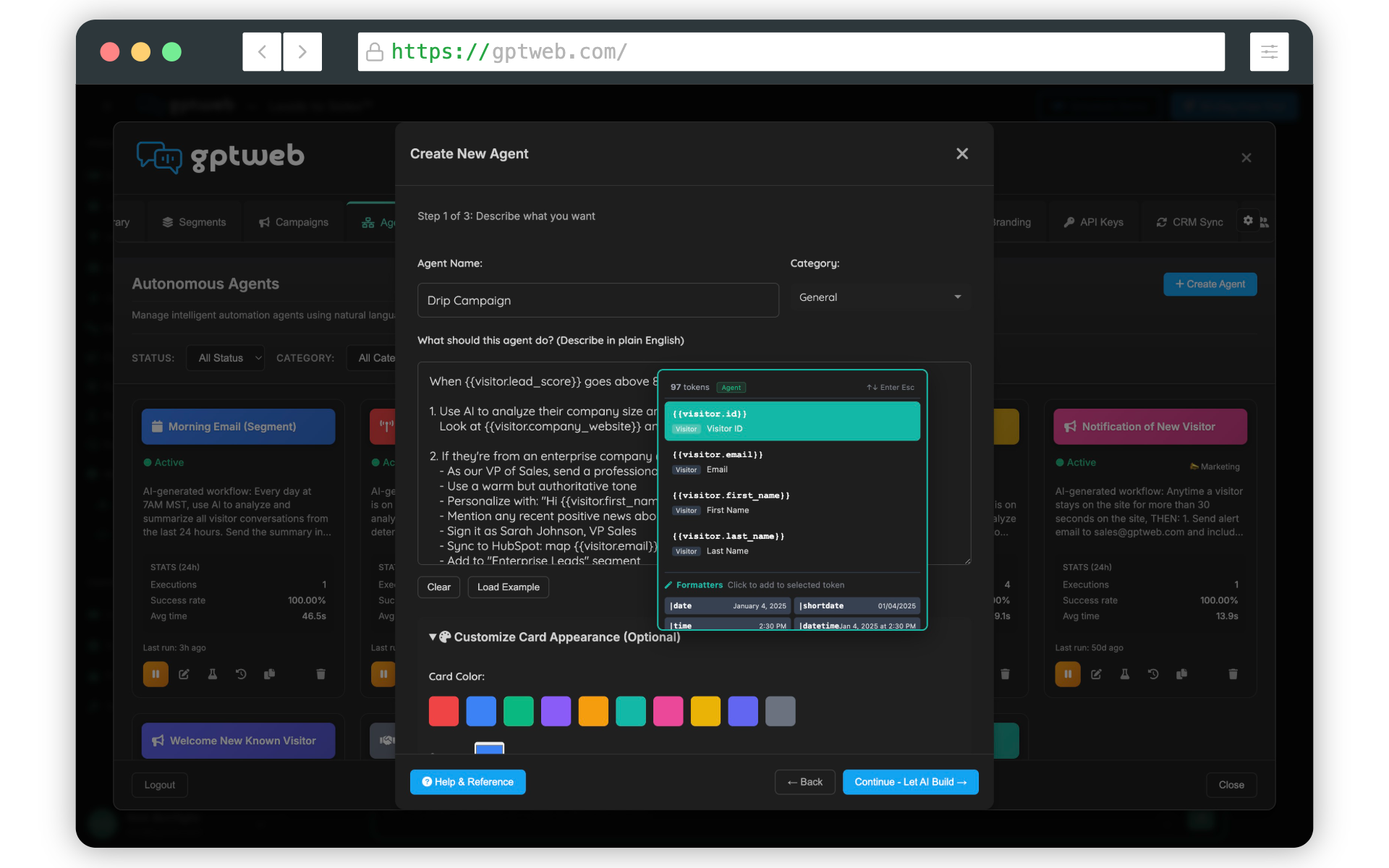
Navigate to Branding → Email Templates and create a template for each drip email (Welcome, Feature Tour, Case Study, Offer, etc.). Use the visual WYSIWYG editor to design branded emails with tokens and AI zones.
Step 2: Create the Agent
In the Agents section, describe your drip sequence in natural language. The AI determines whether to create scheduled emails or batch campaigns based on your description.
Step 3: Review & Activate
Review the generated workflow, select your email templates for each step, and activate the agent. The system handles the rest - scheduling, personalization, and delivery.
Schedule Time Formats
- Relative: +3 days, +2 hours, +30 minutes
- Absolute: 2025-12-25T14:00:00Z (UTC)
- Timezone-aware: Send at 9 AM in each recipient's local timezone (v2.0.0+)
Template Tokens & Personalization
Email templates support powerful personalization through tokens and conditional logic:
- Visitor's first name - Company name - Email address.. - Show if field has value.. - Show if NOT known.. - Conditional logic
AI Zones for Dynamic Content
Templates can include AI zones that generate personalized content based on visitor context. When an agent sends the email, GPTWeb's AI generates unique content for each recipient based on their behavior, interests, and profile.
Key Takeaways
- Agents + Templates = Automated, branded email workflows ✓
- Batch operations send to entire segments at scheduled times ✓
- Drip campaigns nurture visitors with timed email sequences ✓
- Use scheduled emails for individual timing, batch for group sends ✓
- Templates support tokens, AI zones, and conditional logic ✓
- All emails are stored until delivery time with rate limiting ✓
GPTWeb is the future of engagement - combining modern AI-powered websites with next-generation marketing automation built for the AI era, built for now.