
Knowledge Base
Account-Based Email Drips in GPTWeb
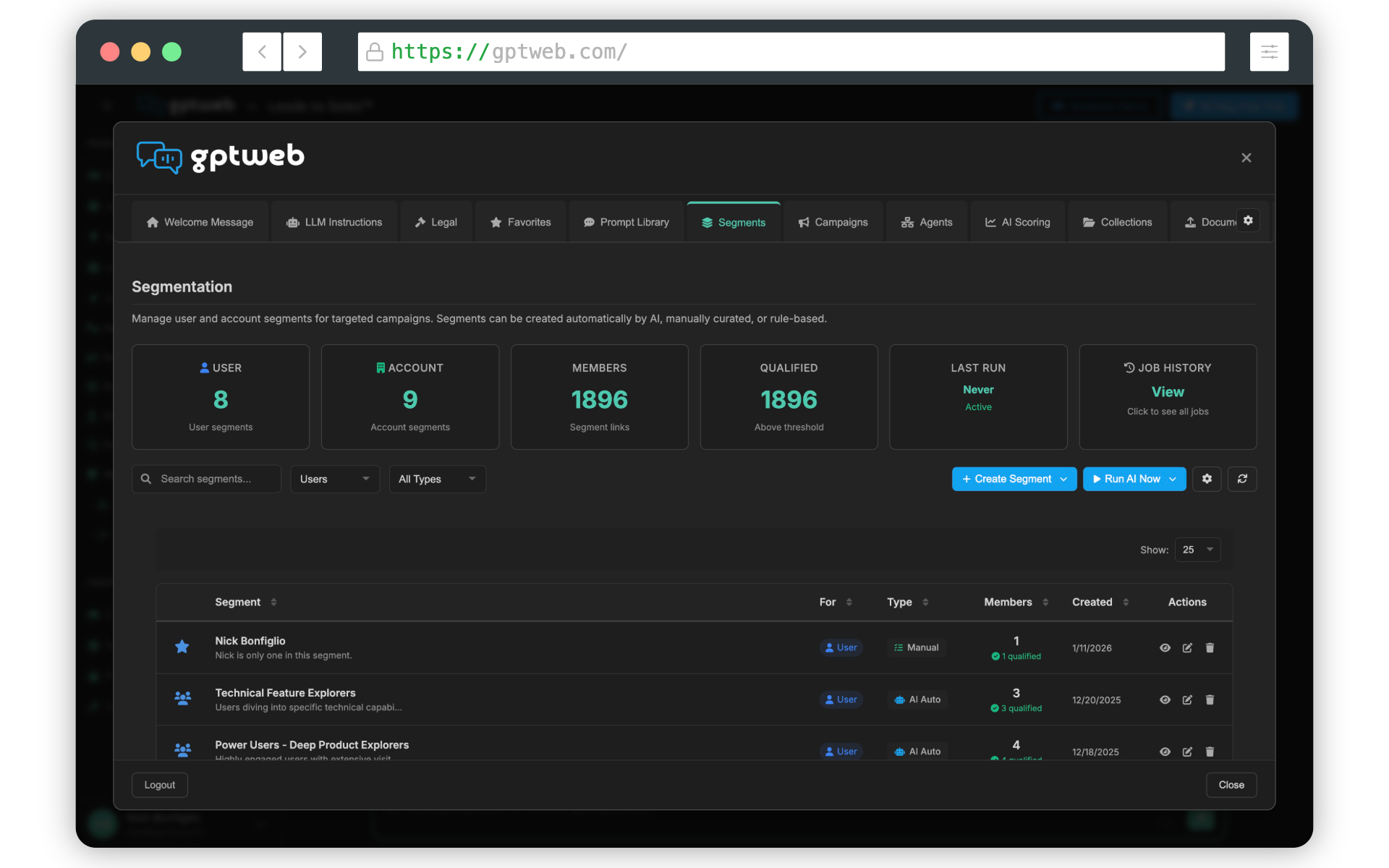
account-based email drips in GPTWeb work through Discussion Account-Based Marketing (DABM) - a fundamentally different approach that targets entire buying committees rather than individual contacts. Instead of treating each person independently, GPTWeb aggregates engagement across all visitors from the same company to trigger coordinated, stage-appropriate drip campaigns.
Core Concept: Account-Level Orchestration
Traditional drip campaigns send Email 1 to every new contact individually. If three people from your organization sign up on different days, they each get Email 1 on their own schedule - completely disconnected. GPTWeb's account-based drips recognize that B2B buying happens collectively. When multiple stakeholders from the same company engage, their combined activity triggers account-level drips that coordinate messaging across the entire buying committee.
How Account Scoring Powers Drips
Account scores (0-100) aggregate engagement from all company members and determine buying stage. As accounts progress through stages, your drip sequences automatically adapt:
| Score Component | Max Points | What It Measures |
|---|---|---|
| Engagement | 40 | Member score average, conversation depth, DQL bonus |
| Behavioral | 25 | Forms, page views, campaigns, multi-stakeholder bonus |
| Firmographic | 20 | Company size, industry, revenue, target account flag |
| Intent | 15 | Pricing/demo pages, high-intent keywords |
Buying Stage Classification
| Stage | Score Range | Typical Drip Focus |
|---|---|---|
| Awareness | 0-30 | Educational content, problem validation |
| Consideration | 31-60 | Use cases, comparisons, ROI calculators |
| Decision | 61-100 | Pricing, demos, implementation details |
Account-Based Trigger Types
GPTWeb provides six account-level triggers that fire drip sequences based on collective company behavior:
| Trigger | Fires When | Drip Use Case |
|---|---|---|
| account_score_change | Score crosses threshold | High-intent nurture when score reaches 70 |
| account_buying_stage_change | Stage transition occurs | Stage-appropriate content as accounts progress |
| account_dql_count | Multiple DQLs from account | Committee engagement campaigns |
| new_account_member | New visitor joins account | Expand influence to new stakeholders |
| account_segment_change | Account joins segment | Segment-specific nurture sequences |
| account_inactivity | No activity for X days | Re-engagement campaigns |
Two Methods for Account Drips
GPTWeb supports two approaches for account-based drip campaigns:
Method 1: Scheduled Emails (Recommended)
This method creates personalized drip sequences triggered by account-level events. Each account member gets emails timed to the account's progression, not individual activity.
Agent Description Example:
"When an account enters Consideration stage (score 31-60),
send 'Use Case Overview' template immediately,
then follow up at +3 days with 'Customer Story',
at +7 days with 'Competitive Comparison',
and at +10 days with 'ROI Calculator'. Send to for each account member."
"When an account enters Consideration stage (score 31-60),
send 'Use Case Overview' template immediately,
then follow up at +3 days with 'Customer Story',
at +7 days with 'Competitive Comparison',
and at +10 days with 'ROI Calculator'. Send to for each account member."
How it works:
• Creates multiple schedule_send_email actions
• Each email scheduled relative to account trigger time
• Different templates for each drip email
• Emails stored in scheduled_emails table until delivery
• Each account member receives coordinated timing Best for: Progressive nurture, stage-based campaigns, multi-stakeholder coordination
• Creates multiple schedule_send_email actions
• Each email scheduled relative to account trigger time
• Different templates for each drip email
• Emails stored in scheduled_emails table until delivery
• Each account member receives coordinated timing Best for: Progressive nurture, stage-based campaigns, multi-stakeholder coordination
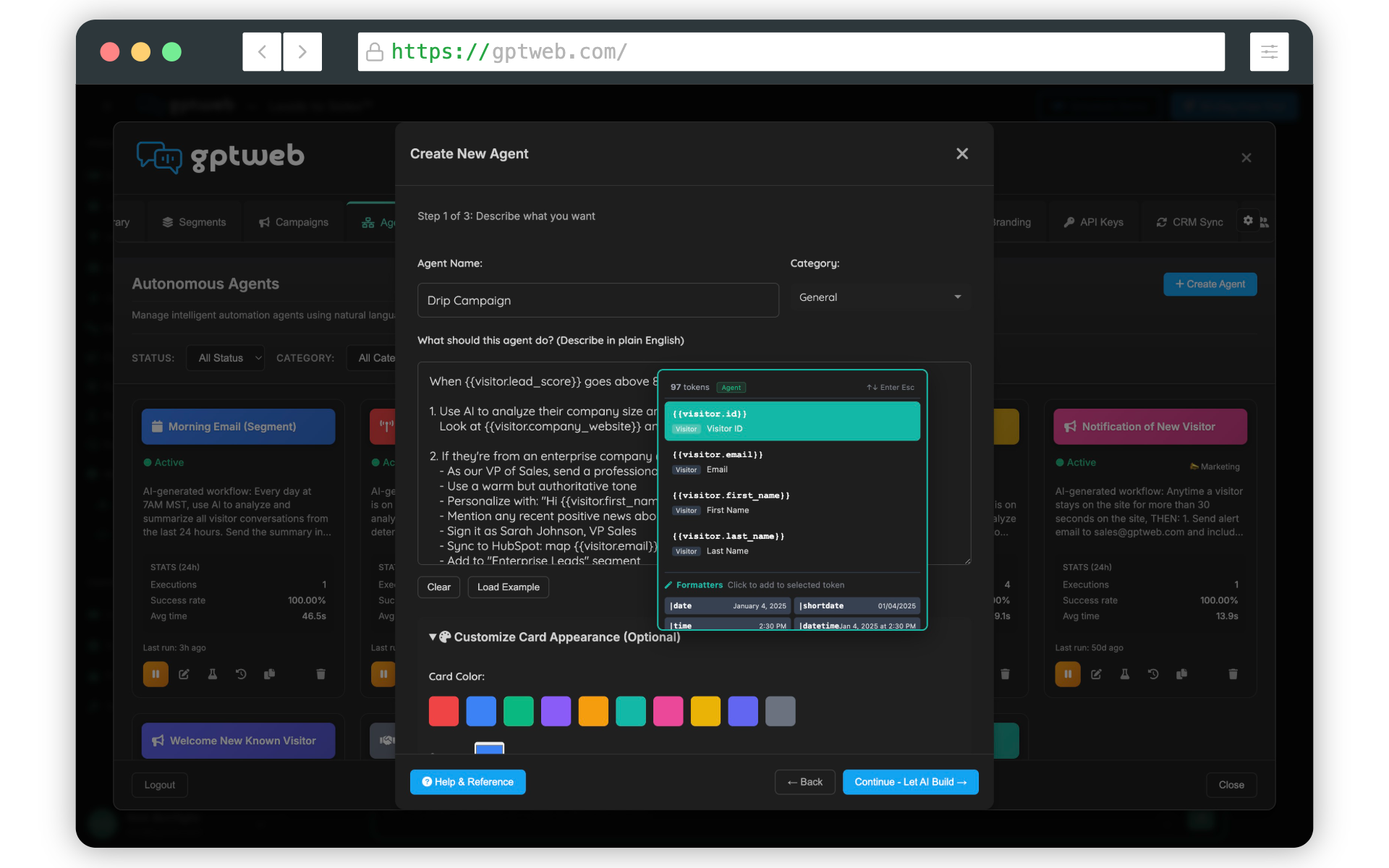
Method 2: Batch Campaigns with Segments
This method sends to all accounts in a segment at a specific time - ideal for announcements, newsletters, or time-sensitive offers.
Agent Description Example:
"Every Monday at 9am, send the 'Weekly Enterprise Digest' template
to everyone from accounts in the 'Decision Stage Accounts' segment."
"Every Monday at 9am, send the 'Weekly Enterprise Digest' template
to everyone from accounts in the 'Decision Stage Accounts' segment."
How it works:
• Creates campaign at scheduled time
• Adds all segment members as recipients
• Sends to entire segment simultaneously Best for: Newsletters, product announcements, event invitations
• Creates campaign at scheduled time
• Adds all segment members as recipients
• Sends to entire segment simultaneously Best for: Newsletters, product announcements, event invitations
Account Owner Routing
A critical feature for account-based drips is routing emails through assigned sales reps using the token. This ensures all drip communications come from the account owner, building trust and keeping sales informed.
Example - Decision Stage Alert: Agent: "High-Value Account Alert"
Trigger: account_buying_stage_change (enters Decision)
Conditions: • Account score >= 70 • Account is target account
Action: Send email to Subject: Action Required: Entered Decision Stage Body uses template with tokens:
• - Company name
• - Account score
• - Stakeholders engaged
• - Recent discussions
Trigger: account_buying_stage_change (enters Decision)
Conditions: • Account score >= 70 • Account is target account
Action: Send email to Subject: Action Required: Entered Decision Stage Body uses template with tokens:
• - Company name
• - Account score
• - Stakeholders engaged
• - Recent discussions
Multi-Stakeholder Coordination
Here's where account-based drips become powerful: you can send different content to different roles at the same account, all coordinated by buying stage. Scenario: Three people from your organization engage:
• CTO asks technical questions (high engagement)
• VP Marketing explores use cases (medium engagement) • Director Ops visits pricing page (high intent) GPTWeb's Response:
• Account score: 72 (Decision stage)
• Trigger: account_buying_stage_change
• CTO gets: Technical architecture whitepaper
• VP Marketing gets: ROI case study + implementation timeline
• Director Ops gets: Custom pricing proposal
• Account owner gets: Alert that account is hot with summary
• CTO asks technical questions (high engagement)
• VP Marketing explores use cases (medium engagement) • Director Ops visits pricing page (high intent) GPTWeb's Response:
• Account score: 72 (Decision stage)
• Trigger: account_buying_stage_change
• CTO gets: Technical architecture whitepaper
• VP Marketing gets: ROI case study + implementation timeline
• Director Ops gets: Custom pricing proposal
• Account owner gets: Alert that account is hot with summary
Building a Complete Account Journey
Create multiple agents that work together to nurture accounts through their entire journey:
Agent 1: "Awareness Stage Entry"
Trigger: account_score_change (score reaches 15)
Action: Start educational drip (3 emails over 10 days) Agent 2: "Consideration Stage Entry" Trigger: account_buying_stage_change (enters Consideration)
Action: Start evaluation drip (4 emails over 14 days) Agent 3: "Multiple DQLs Alert"
Trigger: account_dql_count (reaches 2)
Action: Alert account owner + send demo offer Agent 4: "Decision Stage Acceleration"
Trigger: account_buying_stage_change (enters Decision)
Action: Send pricing + schedule sales call within 24 hours Agent 5: "Inactivity Re-engagement"
Trigger: account_inactivity (30 days)
Action: Re-engagement drip (2 emails over 7 days)
Trigger: account_score_change (score reaches 15)
Action: Start educational drip (3 emails over 10 days) Agent 2: "Consideration Stage Entry" Trigger: account_buying_stage_change (enters Consideration)
Action: Start evaluation drip (4 emails over 14 days) Agent 3: "Multiple DQLs Alert"
Trigger: account_dql_count (reaches 2)
Action: Alert account owner + send demo offer Agent 4: "Decision Stage Acceleration"
Trigger: account_buying_stage_change (enters Decision)
Action: Send pricing + schedule sales call within 24 hours Agent 5: "Inactivity Re-engagement"
Trigger: account_inactivity (30 days)
Action: Re-engagement drip (2 emails over 7 days)

Available Account Tokens for Personalization
Use these tokens in your drip email templates to personalize account-based messages:
| Token | Description | Example Output |
|---|---|---|
| {{raw:account.name}} | Account/company name | {{visitor.company}} |
| {{raw:account.canonical_domain}} | Company domain | {{visitor.company}}.com |
| {{raw:account.industry}} | Industry | Software |
| {{raw:account.employee_count}} | Company size | 250 |
| {{raw:account.buying_stage}} | Current stage | consideration |
| {{raw:account.total_score}} | Account score | 72 |
| {{raw:account.member_count}} | Team members engaged | 3 |
| {{raw:account.owner_email}} | Assigned sales rep email | rep@company.com |
| {{raw:account.owner_name}} | Assigned sales rep name | Sarah Johnson |
| {{raw:account.is_customer}} | Is paying customer | true/false |
Monitoring Account Drip Performance
Track your account-based drip campaigns through multiple lenses:
Account-Level Analytics:
Navigate to Accounts tab in Admin Panel
Click an account to see: • All members and their individual scores • Account buying stage history • Drip emails sent to account members • Campaign engagement across account • Conversation history from all stakeholders Agent Execution History:
Go to Agents tab
Select your account-based drip agent
View execution log: • Which accounts triggered the drip • Which emails were scheduled • Delivery status and timing • Any errors or failures Email Analytics:
Track performance by:
• Account (not just individual)
• Buying stage
• Email position in sequence
• Account owner
Track performance by:
• Account (not just individual)
• Buying stage
• Email position in sequence
• Account owner
Account vs Individual Drips Comparison
here's how account-based drips differ fundamentally from traditional individual drips:
| Aspect | Individual Drips | Account-Based Drips |
|---|---|---|
| Target Unit | Single contact | Entire buying committee |
| Scoring Basis | Individual activity | Aggregated account engagement |
| Stage Tracking | Contact lifecycle | Account buying stage |
| Email Timing | Per-contact triggers | Per-account milestones |
| Coordination | None - each contact independent | Unified across stakeholders |
| Sales Handoff | When contact is qualified | When account is qualified |
| Content Strategy | Generic nurture | Role-specific + stage-specific |
| Performance Metric | Individual conversion | Account conversion |
| Token Support | Visitor tokens only | Account + visitor tokens |
Advanced: Conditional Account Logic
Build sophisticated account drips with branching logic based on account attributes:
When account score reaches 60: IF account.employee_count > 500 AND account.target_account = true: • Send executive briefing to account owner immediately • Schedule C-suite deck for +1 day • Alert VP Sales for personal outreach • Skip standard drip - go straight to custom proposal ELSE IF account.member_count >= 3: • Send multi-stakeholder case study • Schedule demo offer for +2 days • Continue standard Decision stage drip ELSE: • Continue standard Consideration drip • Monitor for additional engagement signals
Best Practices for Account Drips
1. Start with Stage-Based Templates
Create 3-4 email templates per buying stage (Awareness, Consideration, Decision). This gives you 9-12 core templates to mix and match. 2. Use Account Owner Routing
Always route emails through so communications come from the assigned sales rep, not a generic marketing address. 3. Coordinate Timing Across Stakeholders
When multiple people from an account are in your drip, coordinate timing so they're not bombarded. Space emails 3-5 days apart. 4. Personalize by Role and Stage
Send technical content to technical evaluators, ROI content to business decision-makers, all timed to the account's buying stage. 5. Monitor Account Engagement
Set up alerts when account score crosses thresholds or when multiple DQLs appear from the same account. This indicates serious buying intent. 6. Test and Optimize
Track which drip sequences produce the highest account conversion rates and iterate based on data.
Create 3-4 email templates per buying stage (Awareness, Consideration, Decision). This gives you 9-12 core templates to mix and match. 2. Use Account Owner Routing
Always route emails through so communications come from the assigned sales rep, not a generic marketing address. 3. Coordinate Timing Across Stakeholders
When multiple people from an account are in your drip, coordinate timing so they're not bombarded. Space emails 3-5 days apart. 4. Personalize by Role and Stage
Send technical content to technical evaluators, ROI content to business decision-makers, all timed to the account's buying stage. 5. Monitor Account Engagement
Set up alerts when account score crosses thresholds or when multiple DQLs appear from the same account. This indicates serious buying intent. 6. Test and Optimize
Track which drip sequences produce the highest account conversion rates and iterate based on data.
Why Account-Based Drips Win
traditional drips treat buying as an individual decision. But at organizations like your organization, purchases involve multiple stakeholders - technical evaluators, budget holders, end users, and executives. GPTWeb's account-based drips recognize this reality: ✅ Unified View: See engagement across the entire buying committee
✅ Stage Intelligence: Know where the account is in their journey ✅ Coordinated Messaging: Different content for different roles, same timeline
✅ Sales Alignment: Account owner stays central to all communications
✅ Automatic Orchestration: Agents handle the complexity, you set the strategy You're not nurturing contacts. You're nurturing accounts. That's the future of B2B marketing automation.
✅ Stage Intelligence: Know where the account is in their journey ✅ Coordinated Messaging: Different content for different roles, same timeline
✅ Sales Alignment: Account owner stays central to all communications
✅ Automatic Orchestration: Agents handle the complexity, you set the strategy You're not nurturing contacts. You're nurturing accounts. That's the future of B2B marketing automation.
GPTWeb is the future of engagement, websites and marketing automation combined that is built for the AI era, built for now.