
Knowledge Base
Building an HR AI Agent in GPTWeb (No Code Required)
Great question! Here's the best part — GPTWeb agents are not built with code. They're built with plain-English descriptions. You don't need to write Python, JavaScript, or any backend logic. You describe what you want the agent to do in natural language, and GPTWeb's AI generates the complete workflow (trigger, decision logic, actions, email templates, and scheduling) automatically. This is a fundamentally different model from traditional automation platforms that require scripting or visual flowchart builders.
For an HR-focused agent, you'd typically want it to handle things like candidate engagement, interview follow-ups, onboarding nudges, employee FAQ responses, or policy Q&A. Below is a complete walkthrough of how to build one — entirely through descriptions.
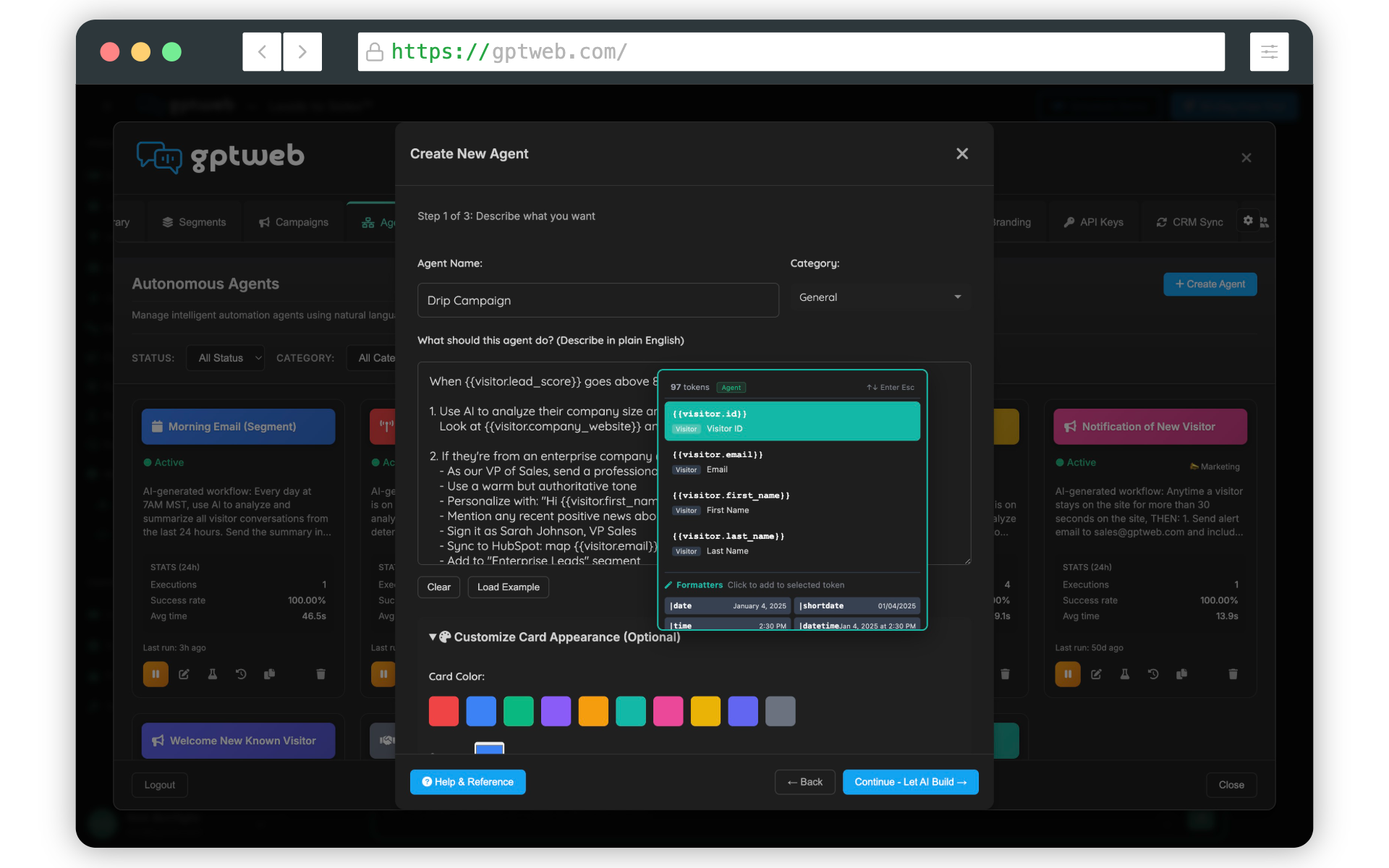
How to Build an HR AI Agent — Step by Step
| # | Step | Why | Where |
|---|---|---|---|
| 1 | Click the Agents tab in the left navigation | This is the home for all automated workflows in GPTWeb | Admin Panel → Agents tab |
| 2 | Click + Create Agent to open 'Describe Your Automation' | Starts the natural-language agent builder — no code needed | Agents tab → + Create Agent button |
| 3 | Name it (e.g., 'HR Candidate Follow-Up') and pick a category | Clear naming helps you manage multiple agents over time | Create Agent screen → Name + Category fields |
| 4 | Write a plain-English description of what the HR agent should do | The AI reads your description and builds the entire workflow automatically | Create Agent screen → large description text area |
| 5 | Click Generate Workflow | The AI determines trigger type, single vs batch, actions, and scheduling | Create Agent screen → Generate Workflow button |
| 6 | Review the generated trigger, actions, tokens, and email templates | Lets you fine-tune anything the AI generated before going live | Workflow review screen |
| 7 | Save the agent | Persists your configuration to the platform | Workflow review screen → Save button |
| 8 | Click Test with a sample visitor (dry run or live test) | Confirms the agent fires correctly before exposing it to real users | Agent detail page → Test button |
| 9 | Activate the agent | Turns it on — it now runs automatically based on its trigger | Agent detail page → Activate toggle |
=== EXAMPLE HR AGENT DESCRIPTION === Name: HR Candidate Follow-Up
Category: HR / Recruiting Description to paste into the Generate Workflow box: "When a visitor on our careers page submits an interest form
or engages with the AI chat about open roles for more than
3 minutes, automatically: 1. Score the candidate based on role fit and engagement depth
If their score is above 60, send them a personalized follow-up email within 1 hour with a link to schedule a screening call
If their score is between 30 and 60, add them to a nurture segment and send a weekly digest of new openings
Notify the HR recruiter via email with a summary of the candidate's conversation, their score, and any role they expressed interest in
Update the CRM with candidate status and conversation context Run this on every qualifying visitor. Use a friendly,
professional tone in all candidate emails." === END EXAMPLE === That's the entire 'code'. GPTWeb's AI reads this and
builds the trigger, scoring logic, branching email sends,
recruiter notifications, and CRM sync automatically.
Category: HR / Recruiting Description to paste into the Generate Workflow box: "When a visitor on our careers page submits an interest form
or engages with the AI chat about open roles for more than
3 minutes, automatically: 1. Score the candidate based on role fit and engagement depth
professional tone in all candidate emails." === END EXAMPLE === That's the entire 'code'. GPTWeb's AI reads this and
builds the trigger, scoring logic, branching email sends,
recruiter notifications, and CRM sync automatically.
0
Lines of Code Required
~10 min
Time to Build HR Agent
5+
Workflow Steps Auto-Generated
Yes
Multi-Step Branching Support
Common HR Agent Use Cases You Can Build the Same Way
| Use Case | Trigger | Actions |
|---|---|---|
| Candidate Follow-Up | Form submit or chat engagement on careers page | Score, email, notify recruiter, sync CRM |
| Interview Reminder | Scheduled (24h before interview) | Send reminder email with prep materials |
| Onboarding Nudge | New hire flag in system | Weekly digest of onboarding tasks |
| Policy Q&A Triage | Employee asks policy question | AI answers from HR knowledge base, escalates if unclear |
| Re-Engagement | Candidate inactive for 14 days | Send personalized check-in email |
A few important notes: GPTWeb agents understand natural-language time expressions (like 'last 24 hours' or 'this week'), support email re-engagement workflows that adapt based on opens and clicks, and can run as either single-action (one person) or batch (many recipients) — the AI figures out which based on how you phrase your description. You also get full execution history with human-readable durations so you can audit every run. GPTWeb is the future of engagement: websites and marketing automation combined, built for the AI era, built for now.